
Introduction
Rspress is a static site generator based on Rsbuild and rendered with React. It ships with a ready-to-use documentation theme so you can launch a site quickly, and it remains easy to tailor for blogs, product pages, or component libraries through theme overrides and official plugins.
Why Rspress
Rspress is designed around the following core features:
- Build Performance. Ensuring a fast enough startup speed brings a good development experience.
- MDX Support. Through MDX, we can conveniently reuse document fragments and render custom React components in documents.
- Basic Capabilities of Documentation Site. Including internationalization, multi-version support, full-text search, component library documentation, etc.
- Extensibility. Provides a built-in plugin system, supports extending Rspress through plugin API.
These align with the core needs of modern static sites. The following sections outline how Rspress addresses each one.
Build performance
As projects grow, slow startup time quickly hurts developer experience. Rspress focuses on instant feedback by relying on a Rust frontend toolchain in two key places:
- Bundler. Rspress uses the team-built Rspack. With Rust, multi-threaded compilation, and incremental rebuilds, it is 5–10× faster than traditional JS bundlers.
- Markdown compiler. Rspress ships with a custom Rust-based compiler (
@rspress/mdx-rs) that is nearly 20× faster than common JS implementations:

Rspress also applies build optimizations such as theme pre-bundling and pre-generated styles. Combined with the Rust toolchain, these keep both development and production builds consistently fast.
MDX support
Rspress adopts MDX to keep content flexible: documents are components, fragments can be reused, and custom React components can be embedded wherever you need them.
Basic capabilities of documentation site
Rspress comes with the core capabilities you expect from a documentation site:
- Automatic layout generation for navigation, sidebar, and outline.
- Static site generation with direct HTML output.
- Internationalization (multiple locales).
- Built-in full-text search.
- Multi-version documentation management.
- Customizable themes.
- Built-in demo preview and playground tooling.
In the following text, we will introduce these functional features in detail.
Extension mechanism
Rspress internally designed various extension mechanisms to ensure sufficient customization capabilities, including:
- Support for custom global components, global styles, page layout structure, please refer to Custom Page.
- Support build extension, including custom Rspack config, adding MDX compilation plugins, etc., please refer to Build Extension.
- Support custom theme, please refer to Custom Theme.
- Built-in plugin system, support for custom plugins, please refer to Plugin System.
Features
Next, let's introduce the main functional features of Rspress.
Automatic layout generation
For the construction of a documentation site, in addition to displaying the main content, we generally need the following layout modules:
- Navigation bar, used to provide global navigation entrance.
- Sidebar, used to display the article directory under the current navigation.
- Article outline column, used to display the outline structure of the current page.
For the document outline, Rspress will automatically extract the various titles in the document, generate outline information, and display it on the right side of the article page by default, without any other operations.
For the navigation bar and sidebar, we provide two config methods. Choose whichever fits your workflow:
- Declarative config. Configure the corresponding data by declaring
_meta.jsonin the directory, such as:
You can read the Auto Nav/Sidebar for config details.
- Programming config. Implement it by specifying the nav and sidebar config items in the Rspress config.
We recommend declarative config in most cases because it keeps config concise, matches the directory structure intuitively, and avoids jumping back to rspress.config.ts when adding or removing sidebar items.
Programming config shines when config is generated dynamically. For example, the TypeDoc plugin converts TypeDoc JSON output directly into nav and sidebar configs.
MDX support
MDX is a powerful content development format. You can not only write Markdown files as usual, but also use React components in the content of Markdown:
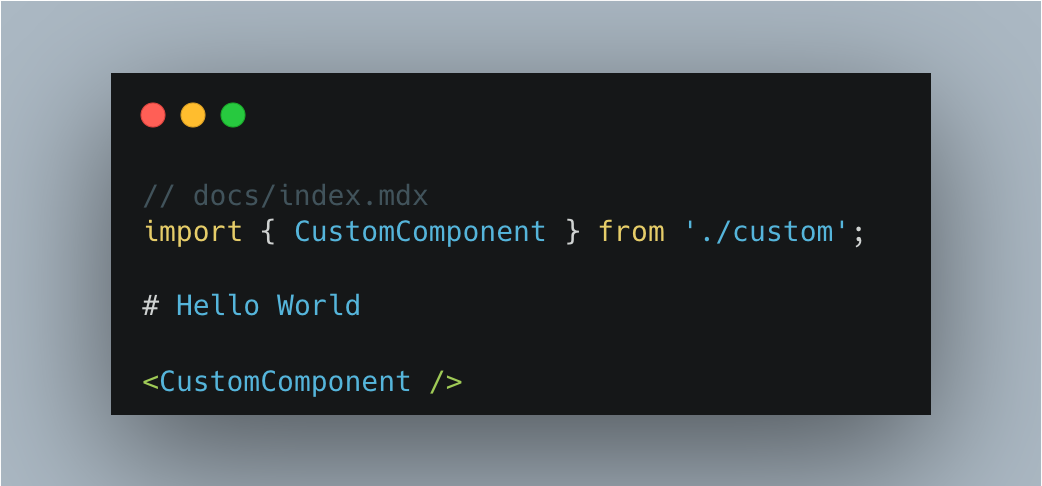
In addition, Rspress also supports some specific syntax, such as:
- Custom container syntax.
- FrontMatter metadata definition.
- Code line highlighting syntax.
Details can be found in the Use MDX Document.
SSG
Rspress is a SSG framework. In the build process in the production environment, it will automatically help you generate static sites, that is, generate HTML content for each page. After the build process is completed, HTML will appear in the default output directory.
Then, you can deploy the contents of this product directory to any static site hosting service, such as GitHub Pages, Netlify, Vercel, etc.
You can further customize the generated HTML via config. See the Static Site Generation guide for details.
Internationalization (I18n)
Internationalization is a common requirement in a document-type site, and Rspress encapsulates the ability of internationalization to be simple and easy to use. In Rspress, we abstract internationalization into the following requirements:
- How to define I18n data source?
- How to configure the site under different languages?
- How to organize the document directory of different language versions?
- How to use I18n data source in custom components?
Rspress has already supported these demand scenarios for you. You can follow the I18n Tutorial to step by step to implement internationalization for your site.
Multi-version Documents
In some scenarios, we need to manage multi-version documents, and Rspress has built-in support for multi-version documents. On the one hand, you can enable this capability through simple config. On the other hand, you only need to organize the directory as usual, without introducing unnecessary directories and concepts, minimizing the mental burden:
Full text search
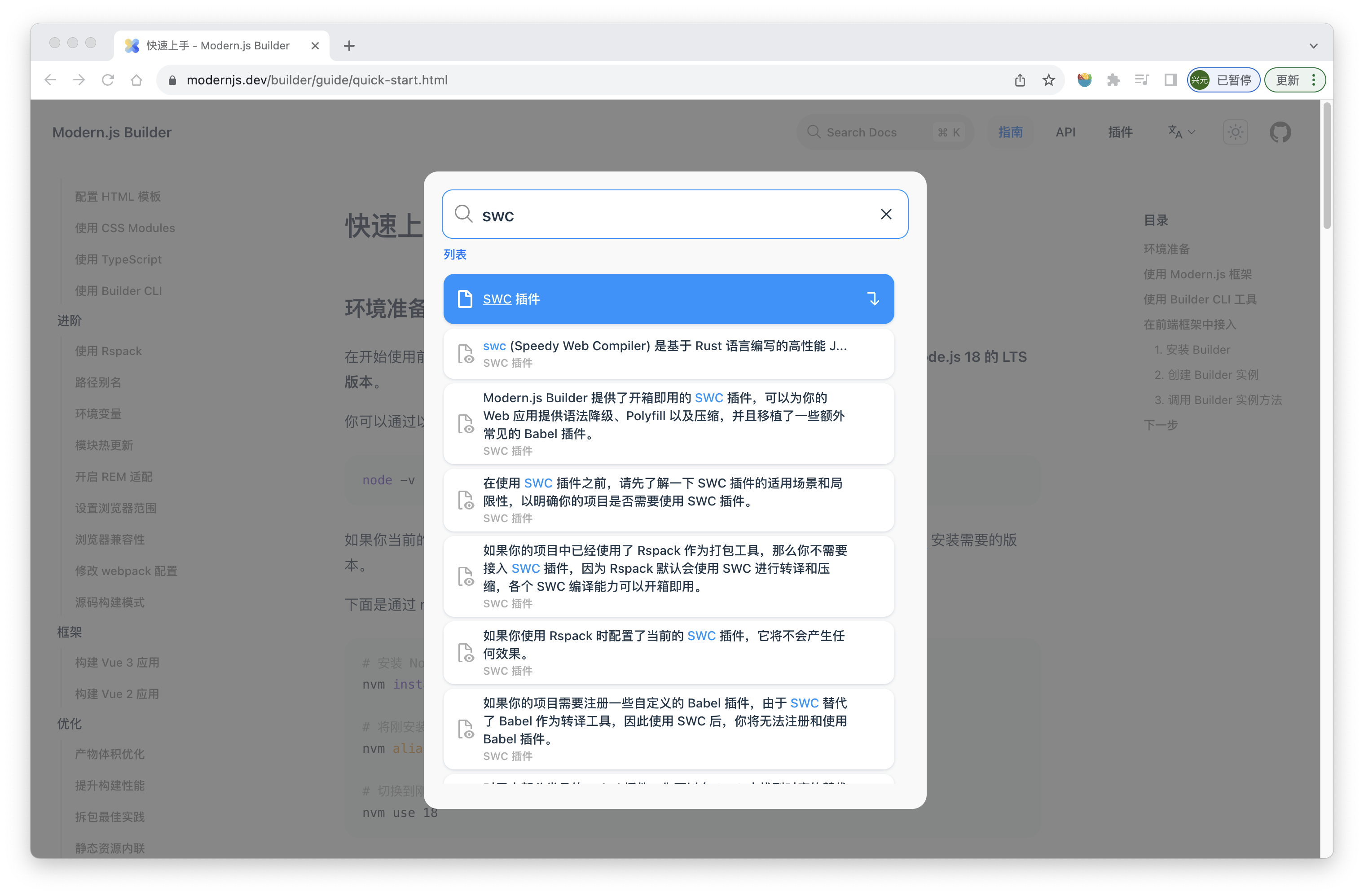
Rspress provides out-of-the-box full-text search with no config required. It is powered by the FlexSearch engine:
Custom theme
Rspress supports two ways to customize themes:
- Extend from the default theme. In each component of the default theme, many slots are provided for you to add custom layout content, for example:
- Fully customized theme. If you want to develop a custom theme from scratch, you can customize the content of Layout and use various Runtime APIs provided by Rspress (such as
usePageData) to obtain compile-time data, routing information, etc.
For details about custom themes, see the Custom Theme Documentation.
Plugin system
The plugin system is central to Rspress and lets you extend functionality while building your site. Details are in the Plugin Introduction Documentation.
Component documentation
Demo preview
Rspress provides a preview plugin, which can automatically generate component previews for you. After you register the preview plugin, declare the following code block in the mdx file:
Then you can see the following preview effect:
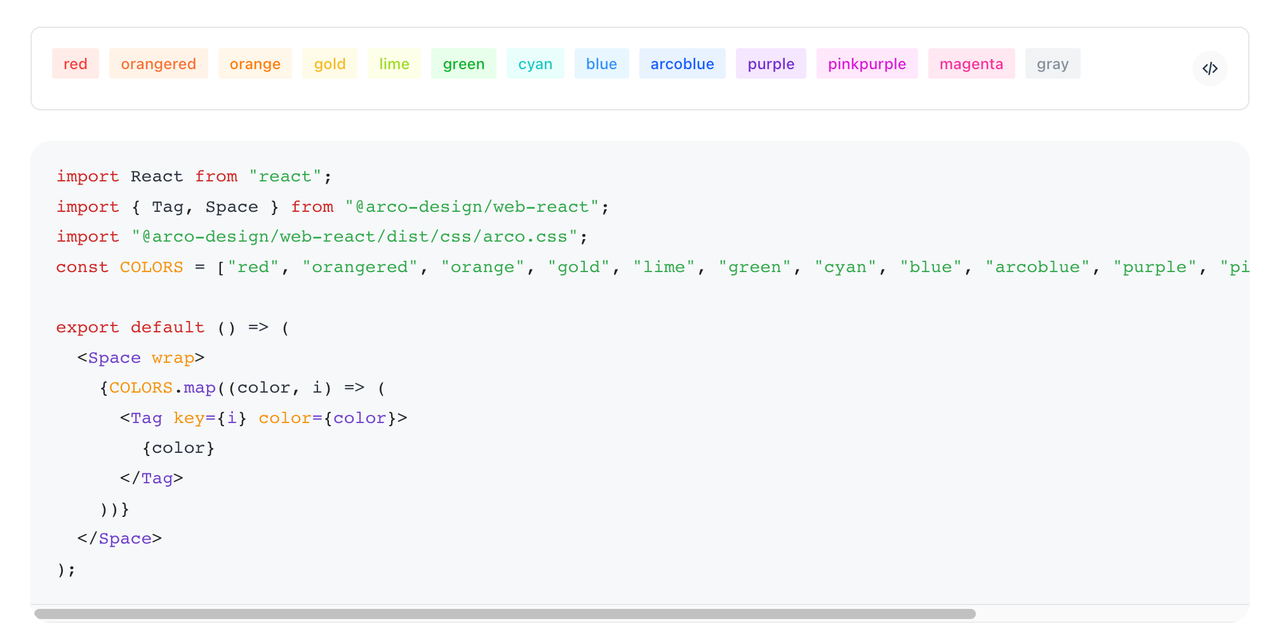
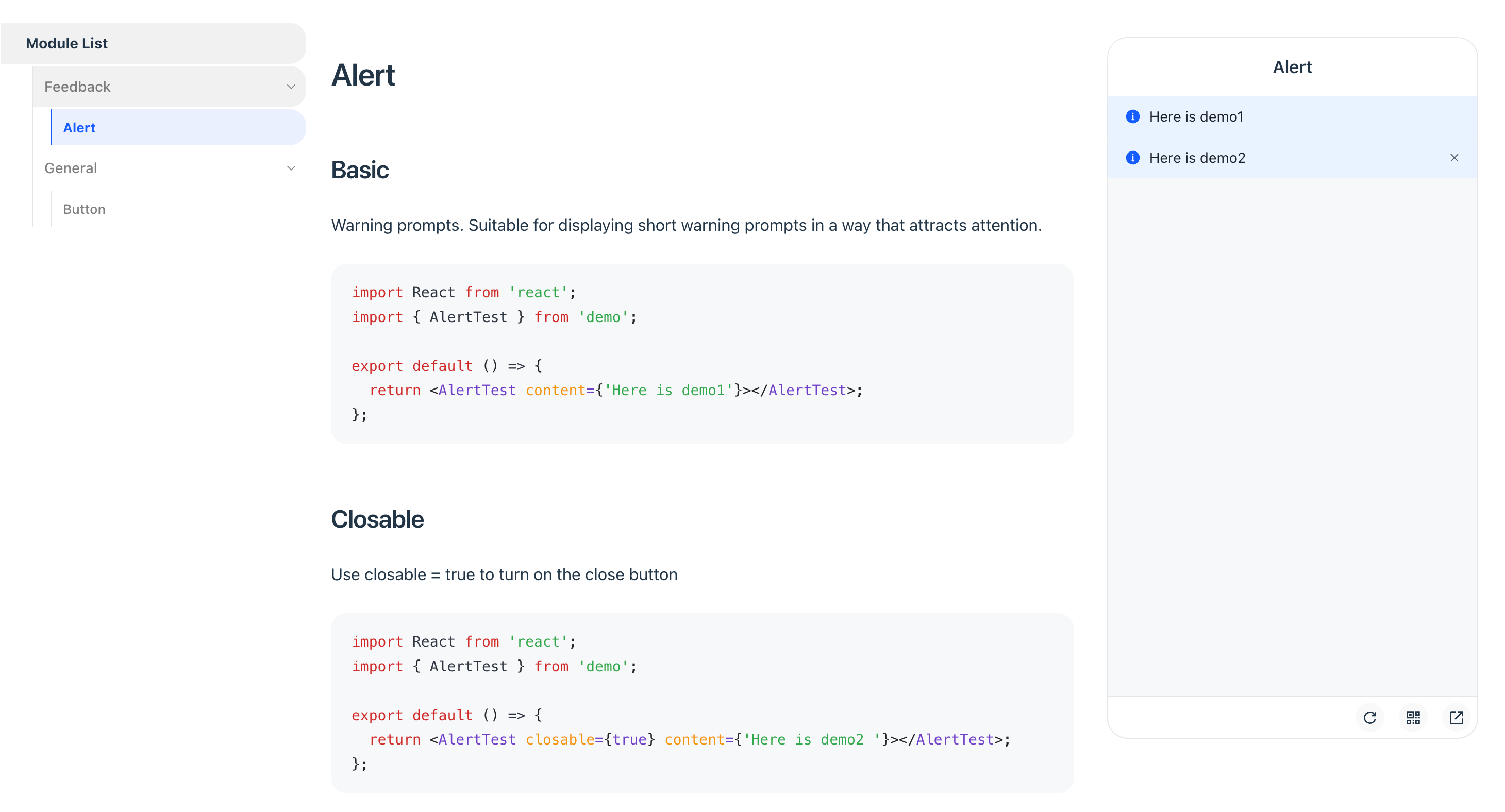
Of course, the plugin also supports mobile preview mode, which you can enable through plugin config:
Demo real-time playground
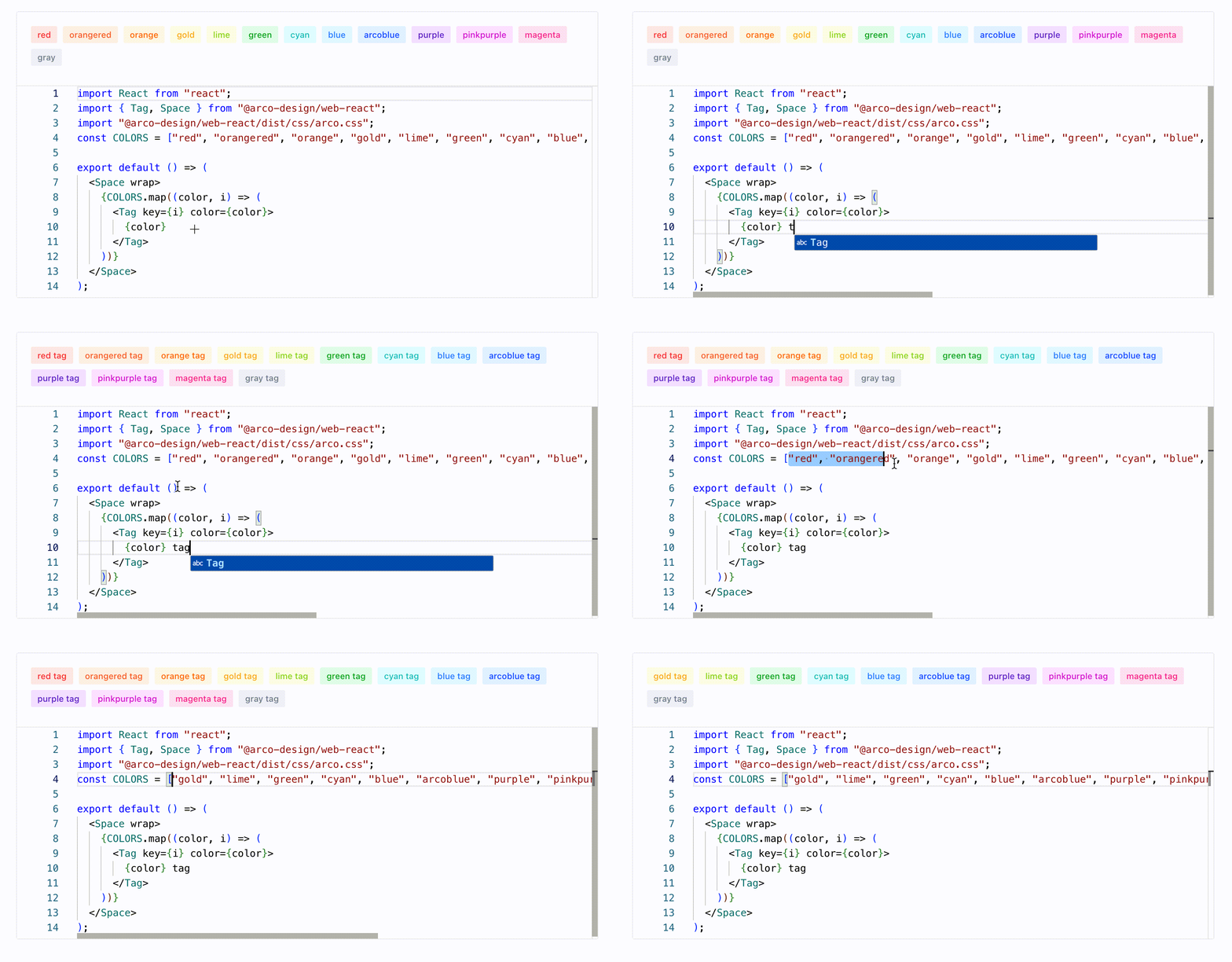
For component documentation, if real-time editing capabilities can be provided for components, it will greatly enhance the interactive experience of the documentation.
To achieve this feature, you only need to register the official playground plugin, and then declare your code block in the .mdx file. (Take the above code block as an example)
Next, you will see the following playground effect in the documentation:
Built-in smooth transition animation
View Transition API is a set of APIs natively provided by modern browsers for implementing transition effects during page jumps. In Rspress, we also followed up on this feature, implemented document transition animations based on View Transition, and did not use any third-party SPA animation schemes. In the future, we will explore more animation effects to further enhance the experience.
Differences from other SSG frameworks
Differences from Docusaurus
Docusaurus is an open-source SSG framework by Meta. Like Rspress, it uses React as the rendering framework and supports MDX. However, the main differences between Rspress and Docusaurus are:
-
Rspress uses mdx-rs by default to provide better build performance. For details, see Build Performance.
-
Rspress has simpler config and lower learning curve. Rspress's config is simpler, does not introduce too many concepts, and reduces cognitive load as much as possible. For example, it provides out-of-the-box search functionality, intuitive multi-version document management, etc.
-
Rspress provides a higher level of abstraction for Bundler in its architecture. For low-level Bundlers like webpack and Rspack, their config items are complex and not easy to get started with. Docusaurus chooses to directly expose the config items of the underlying Bundler, while Rspress provides a higher level of abstraction for Bundler, offering simpler and more user-friendly config items. For instance, you can easily add tags in
<head>throughbuilderConfig.html.tags, without having to register related plugins via Bundler likehtml-webpack-plugin.
Differences from Nextra
Nextra is an open-source SSG framework by Vercel. Like Rspress, it also uses React as the rendering framework and supports MDX. The main differences between Rspress and Nextra are:
- Rspress has better build performance. This point can be referred to "Differences from Docusaurus".
- Rspress is overall lighter. Nextra relies on Next.js, and its SSG process is also based on Next.js. Therefore, the SSG output is not purely HTML files, but includes some runtime code from Next.js. On one hand, this leads to a larger size of Nextra's output. On the other hand, it needs to be deployed as an application (using the
next startcommand) rather than being deployed as a pure static site. But Rspress is not bound to any application framework, so its output is lighter and can be conveniently deployed as a pure static site.
Differences from VitePress
VitePress is a static site generator based on Vite. It is characterized by using Vue as the rendering framework and has excellent performance. The main differences between Rspress and VitePress are:
- Rspress uses React as the rendering framework, while VitePress uses Vue.
- Rspress uses MDX for content development, while VitePress uses Markdown and supports Vue components in Markdown, which also leads to differences in the implementation of the underlying compilation toolchain.
- In terms of build performance, during the development phase, both Rspress and VitePress can quickly start a project. However, in the production environment, VitePress needs to bundle the project based on Rollup, so it will face similar performance issues with other JavaScript-based toolchains. At this time, Rspress will have faster build speed.
Try Rspress
Go to Quick start to learn how to use Rspress to quickly build a documentation site.